
Cross-platform mobile development has changed how businesses build digital products. Instead of maintaining separate codebases for Android and iOS, companies can now develop a single application that runs across multiple platforms while reducing development costs, accelerating time to market, and simplifying long-term maintenance.
However, creating a great mobile experience isn’t just about choosing the right frontend framework. Every successful mobile application relies on a powerful backend to manage authentication, business logic, databases, payments, notifications, file storage, and integrations with third-party services.
That’s where Laravel stands out.
Laravel has changed far beyond a traditional PHP framework. Today, it powers everything from startup MVPs to enterprise applications serving millions of users. Combined with technologies like Flutter, React Native, and the emerging NativePHP AIR, Laravel enables developers to build secure, scalable, and feature-rich cross-platform mobile applications using an API-first architecture.
In this guide, you’ll learn how Laravel fits into modern mobile development, compare the leading cross-platform technologies, explore recommended architectures, and discover best practices for building applications that scale.
Why Cross-Platform Development Has Become the Standard
Just a few years ago, businesses typically built separate Android and iOS applications. While this approach offered maximum platform customization, it also required two development teams, duplicated effort, and significantly higher maintenance costs.
Today’s cross-platform frameworks have changed that equation.
Using a shared codebase allows development teams to release features faster while maintaining consistent functionality across platforms. This approach benefits startups trying to launch quickly, SaaS companies continuously shipping new features, and enterprises looking to reduce engineering overhead.
Some of the biggest advantages include:
| Benefit | Business Impact |
|---|---|
| Single codebase | Lower development costs |
| Faster releases | Reduced time to market |
| Easier maintenance | One application to update |
| Consistent UI | Better user experience |
| Shared backend | Simpler architecture |
| Higher ROI | Reduced long-term expenses |
Modern frameworks have matured to the point where users often cannot distinguish between native and cross-platform applications.
Where Laravel Fits Into Mobile Development
One of the biggest misconceptions is that Laravel builds the mobile application’s user interface.
It doesn’t.
Instead, Laravel acts as the backend that powers every important feature behind the scenes.
Whenever a user logs in, browses products, uploads images, completes a payment, sends a message, or receives a notification, the mobile application communicates with Laravel through APIs.
Laravel processes the request, interacts with the database, applies business rules, and returns structured JSON responses that the mobile application displays.
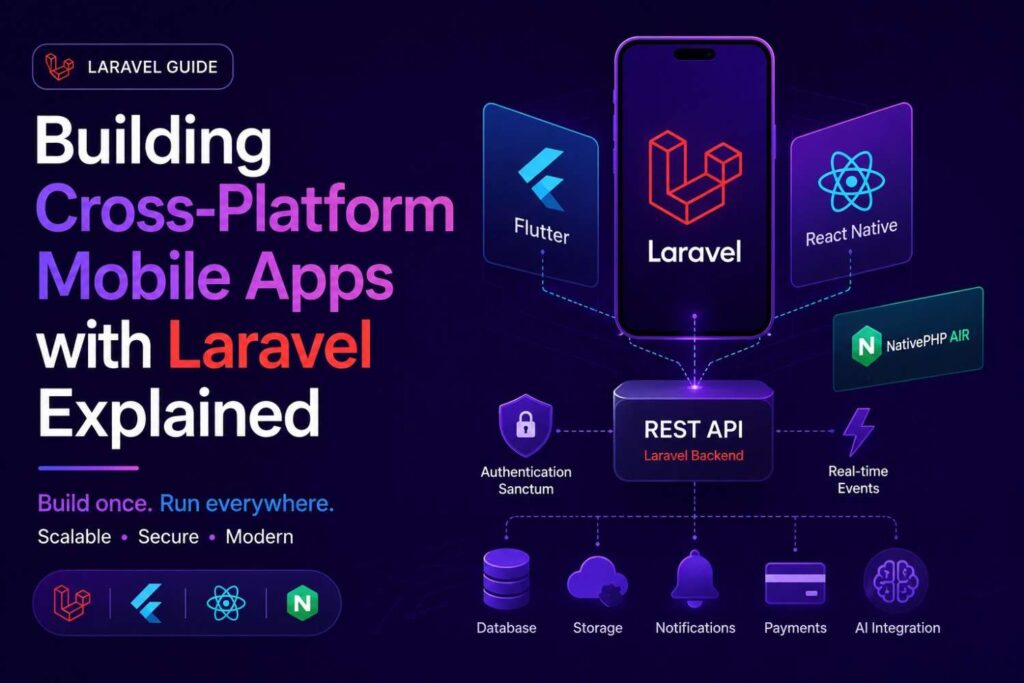
A typical architecture looks like this:
                    Flutter App
                         │
                         │
                 React Native App
                         │
                         │
                  NativePHP AIR
                         │
                  HTTPS / REST API
                         │
               Laravel Backend API
      ┌────────────┼─────────────┐
      │            │             │
   MySQL       Redis Cache   Queue Workers
      │            │             │
      └────────────┼─────────────┘
                   │
      Storage • Payments • AI APIs
      Email • SMS • Maps • Analytics
This architecture separates frontend and backend responsibilities, making the application easier to maintain and scale over time.
Why Laravel Is an Excellent Backend for Mobile Apps
Laravel has become one of the most widely adopted backend frameworks because it balances developer productivity with enterprise-grade capabilities.
Unlike lightweight frameworks that require extensive setup, Laravel includes many features needed for modern mobile applications out of the box.
Some of its strongest capabilities include:
| Feature | Why It Matters |
|---|---|
| REST API Development | Build secure mobile APIs quickly |
| Laravel Sanctum | Simple API authentication |
| Laravel Passport | OAuth 2.0 implementation |
| Eloquent ORM | Elegant database management |
| Queues | Background processing |
| Broadcasting | Real-time communication |
| Notifications | Push notifications |
| Cache | Faster API responses |
| Task Scheduling | Automated background tasks |
| File Storage | Cloud storage integration |
Together, these features allow development teams to spend less time building infrastructure and more time delivering business value.
Choosing the Right Cross-Platform Framework
Laravel works exceptionally well with several frontend technologies. The three most popular options today are Flutter, React Native, and NativePHP AIR.
Each takes a different approach to mobile development, making the right choice dependent on your team’s expertise, project requirements, and long-term goals.
Laravel + Flutter
Flutter, developed by Google, has become one of the most popular frameworks for cross-platform development.
Applications are written in Dart and compiled directly into native machine code, resulting in smooth animations, consistent interfaces, and impressive performance.
Flutter works particularly well for applications that require custom UI components, rich animations, and highly responsive user experiences.
Popular use cases include:
- Banking applications
- Healthcare platforms
- eCommerce apps
- Food delivery services
- Ride-sharing applications
- Enterprise dashboards
Laravel complements Flutter by handling APIs, authentication, databases, notifications, and payment processing while Flutter focuses entirely on the user interface.
Flutter Architecture
Flutter UI
     │
HTTP Client (Dio)
     │
REST API
     │
Laravel Backend
     │
Database
Laravel + React Native
React Native remains one of the most mature cross-platform frameworks available today.
Developed by Meta, it enables developers to build mobile applications using JavaScript and React.
Organizations already using React for web development often choose React Native because it allows developers to work across web and mobile projects using similar technologies.
Laravel provides the backend while React Native consumes APIs through libraries like Axios or Fetch.
This combination is ideal for:
- Startup MVPs
- Social media applications
- Marketplace platforms
- CRM systems
- SaaS products
React Native also benefits from a massive ecosystem of community packages, making it easy to integrate maps, cameras, biometrics, payments, and device hardware.
Laravel + NativePHP AIR
One of the most exciting developments in the Laravel ecosystem is NativePHP AIR.
Unlike Flutter and React Native, NativePHP allows Laravel developers to build desktop and mobile applications using PHP rather than learning Dart or JavaScript.
Instead of treating Laravel as only a backend framework, NativePHP enables developers to leverage familiar Laravel concepts across the application.
This dramatically reduces the learning curve for PHP teams while simplifying development workflows.
However, NativePHP AIR is still relatively new compared to Flutter and React Native. While it shows enormous promise, its ecosystem and community are still growing.
For organizations already invested heavily in Laravel, NativePHP AIR represents an exciting option worth watching over the coming years.
Flutter vs React Native vs NativePHP AIR
| Feature | Flutter | React Native | NativePHP AIR |
|---|---|---|---|
| Programming Language | Dart | JavaScript | PHP |
| Performance | ⭐⭐⭐⭐⭐ | ⭐⭐⭐⭐☆ | ⭐⭐⭐⭐☆ |
| UI Flexibility | Excellent | Very Good | Good |
| Learning Curve | Medium | Easy | Very Easy for Laravel Developers |
| Ecosystem | Mature | Very Mature | Growing |
| Community | Large | Massive | Emerging |
| Best For | Enterprise Apps | MVPs & SaaS | Laravel Teams |
| Laravel Integration | Excellent | Excellent | Native |
Which One Should You Choose?
If performance and polished UI are your priorities, Flutter remains the strongest option.
If your team already works extensively with React, React Native provides a familiar development experience.
If your developers primarily specialize in Laravel and PHP, NativePHP AIR offers an exciting opportunity to reuse existing skills while embracing a modern cross-platform workflow.
Designing an API-First Laravel Backend
Every successful mobile application begins with a well-designed API.
Instead of thinking about screens first, backend developers should model business processes.
For example:
| User Action | Laravel API |
|---|---|
| Login | POST /api/login |
| Register | POST /api/register |
| Products | GET /api/products |
| Orders | POST /api/orders |
| Profile | PUT /api/profile |
Laravel’s routing system makes it easy to organize APIs into clean, versioned endpoints.
Route::prefix('v1')->group(function () {
    Route::apiResource('products', ProductController::class);
    Route::apiResource('orders', OrderController::class);
});
Using API versioning ensures future updates don’t break existing mobile applications installed on users’ devices.
Why API Resources Matter
Returning raw database models directly from controllers may seem convenient during development, but it quickly becomes problematic as applications grow.
Laravel API Resources provide a consistent response structure, hide sensitive fields, and make future updates significantly easier.
Instead of exposing every database column, developers can return only the information required by the mobile application.
return new ProductResource($product);This improves security, reduces payload size, and keeps your APIs predictable.
Secure Mobile Authentication with Laravel
Authentication is one of the most important aspects of any mobile application. Whether you’re building an eCommerce platform, banking app, SaaS product, or social network, users expect a fast and secure login experience that protects their personal information.
Laravel simplifies authentication by providing multiple solutions that fit different application architectures. Instead of implementing authentication from scratch, developers can leverage Laravel’s built-in tools to create secure, scalable login systems with minimal effort.
The right authentication strategy depends on your application’s complexity, user base, and third-party integration requirements.
Laravel Sanctum vs Passport vs JWT
Laravel supports several authentication methods, but not every project needs the same level of complexity.
The following comparison helps determine which solution best fits your application.
| Feature | Laravel Sanctum | Laravel Passport | JWT Authentication |
|---|---|---|---|
| Best For | Mobile Apps & SPAs | Enterprise APIs | Custom Authentication |
| OAuth 2.0 | ❌ | ✅ | ❌ |
| Personal Access Tokens | ✅ | ✅ | ✅ |
| Easy Setup | ⭐⭐⭐⭐⭐ | ⭐⭐⭐ | ⭐⭐⭐⭐ |
| Performance | Excellent | Very Good | Excellent |
| Third-Party API Authorization | No | Yes | Limited |
| Recommended for Most Mobile Apps | ✅ | Only When Needed | Sometimes |
For most Flutter and React Native applications, Laravel Sanctum offers the ideal balance between simplicity and security. It provides token-based authentication without introducing the complexity of OAuth 2.0.
Passport becomes valuable when your application must authenticate with third-party services or support enterprise-grade authorization workflows.
JWT authentication is another popular option, especially for teams that prefer stateless authentication. However, Sanctum integrates more naturally with the Laravel ecosystem and is easier to maintain over time.
Typical Authentication Flow
Regardless of the frontend technology, the authentication process generally follows the same sequence.
User Opens App
       │
       ▼
Login Screen
       │
       ▼
Laravel API
       │
Validate Credentials
       │
       ▼
Generate API Token
       │
       ▼
Store Token Securely
       │
       ▼
Authenticated Requests
Instead of requiring users to log in before every request, the mobile application includes the access token in the HTTP Authorization header.
Laravel validates the token and grants access to protected resources.
Implementing Login APIs
Laravel makes it straightforward to create secure authentication endpoints.
A simple login controller might look like this:
public function login(LoginRequest $request)
{
    if (!Auth::attempt($request->validated())) {
        return response()->json([
            'message' => 'Invalid credentials'
        ], 401);
    }

    $token = $request->user()->createToken('mobile')->plainTextToken;

    return response()->json([
        'token' => $token,
        'user' => $request->user()
    ]);
}
Using dedicated Request classes keeps validation logic separate from business logic while improving code readability.
After receiving the access token, Flutter or React Native can securely store it using encrypted device storage.
Supporting Social Login
Many users prefer signing in with existing accounts instead of creating another username and password.
Laravel integrates easily with popular identity providers through Laravel Socialite, enabling authentication with services such as:
- Apple
- GitHub
- Microsoft
Social login reduces registration friction, improves conversion rates, and provides a smoother onboarding experience.
For enterprise applications, combining Socialite with Single Sign-On (SSO) creates an even more seamless authentication workflow.
Building Secure REST APIs
Security extends far beyond user authentication.
Every API endpoint should validate incoming requests, verify user permissions, and protect sensitive information before returning a response.
Laravel includes many security features by default, helping developers defend against common vulnerabilities.
Some of the most important protections include:
| Security Feature | Purpose |
|---|---|
| Request Validation | Prevent invalid data |
| Authorization Policies | Restrict user actions |
| Password Hashing | Protect credentials |
| API Rate Limiting | Prevent abuse |
| HTTPS Enforcement | Encrypt traffic |
| Signed URLs | Secure temporary links |
| CSRF Protection | Web application security |
| Input Sanitization | Reduce injection risks |
Even though CSRF protection primarily applies to web applications, validation, authorization, and encrypted communication remain essential for mobile APIs.
Structuring API Responses
One characteristic of well-designed APIs is consistency.
Every endpoint should return predictable JSON structures so frontend developers always know what to expect.
A standardized response might look like this:
{
    "success": true,
    "message": "Product retrieved successfully",
    "data": {
        "id": 12,
        "name": "Wireless Earbuds",
        "price": 89.99
    }
}
Consistent response formatting simplifies frontend development, improves debugging, and reduces repetitive code.
Real-Time Features with Laravel
Modern users expect updates instantly.
Whether they’re chatting with friends, tracking deliveries, monitoring investments, or collaborating on projects, waiting several seconds to refresh data creates a poor experience.
Laravel supports real-time communication through event broadcasting and WebSockets.
Instead of repeatedly polling the server, the backend pushes updates whenever important events occur.
Common real-time features include:
| Feature | Example |
|---|---|
| Live Chat | Customer support |
| Order Tracking | Delivery updates |
| Ride Sharing | Driver location |
| Team Collaboration | Shared documents |
| Stock Prices | Financial apps |
| Auctions | Live bidding |
| Sports Apps | Live scores |
| Gaming | Multiplayer updates |
For applications requiring instant communication, Laravel Reverb (or compatible WebSocket infrastructure) offers a modern solution that integrates naturally with Laravel’s event system.
Event Broadcasting Workflow
User Action
      │
      ▼
Laravel Event
      │
      ▼
Broadcast Channel
      │
      ▼
WebSocket Server
      │
      ▼
Flutter / React Native
This event-driven architecture reduces unnecessary network requests while improving responsiveness.
Push Notifications
Push notifications remain one of the most effective ways to increase user engagement.
They notify users about new messages, completed orders, payment confirmations, appointment reminders, promotions, and system alerts—even when the application isn’t running.
Laravel’s Notification system supports multiple delivery channels while keeping notification logic organized in dedicated classes.
For mobile applications, notifications are typically delivered using:
| Platform | Service |
|---|---|
| Android | Firebase Cloud Messaging (FCM) |
| iOS | Apple Push Notification Service (APNs) |
Laravel queues notifications automatically, ensuring users receive responses immediately while notification delivery happens in the background.
Supporting Offline Mode
Reliable internet access cannot always be guaranteed.
Field workers, delivery drivers, healthcare professionals, and travelers frequently operate in areas with limited connectivity.
Applications that continue functioning offline provide a significantly better user experience.
The frontend stores essential information locally and synchronizes with Laravel whenever connectivity is restored.
Typical offline capabilities include:
- Completing inspection reports
- Saving notes
- Editing customer information
- Recording inventory
- Capturing signatures
- Filling forms
Instead of rejecting every request without internet access, offline synchronization keeps users productive regardless of network conditions.
File Uploads and Media Management
Many applications allow users to upload images, videos, invoices, profile pictures, contracts, and documents.
Laravel’s Storage system abstracts file management, allowing developers to switch between local storage and cloud providers without changing application logic.
Popular storage providers include:
| Cloud Storage | Laravel Support |
|---|---|
| Amazon S3 | Excellent |
| Google Cloud Storage | Excellent |
| Azure Blob Storage | Excellent |
| DigitalOcean Spaces | Excellent |
Before storing uploaded files, Laravel should validate:
- File size
- MIME type
- Image dimensions
- Allowed extensions
Large uploads often benefit from background processing, where queues handle image compression, thumbnail generation, and optimization after the upload completes.
Payment Gateway Integration
Payments are at the heart of many mobile applications, from subscription platforms to online marketplaces.
Laravel integrates with numerous payment providers through official SDKs and community-maintained packages.
Some of the most widely used gateways include:
| Gateway | Best For |
|---|---|
| Stripe | SaaS & Subscriptions |
| PayPal | Global Payments |
| Square | Retail |
| Razorpay | India |
| Paddle | Software Licensing |
| Paystack | Africa |
Regardless of the provider, payment verification should always happen on the Laravel server rather than relying solely on the mobile application.
Server-side verification protects against fraud while ensuring accurate transaction records.
Integrating AI Into Mobile Applications
Artificial intelligence has quickly become a standard feature in modern mobile apps.
Laravel acts as an excellent integration layer for AI services because it centralizes authentication, request validation, caching, logging, and billing.
Popular AI integrations include:
| AI Service | Common Use Cases |
|---|---|
| OpenAI | Chatbots, text generation |
| Google Gemini | AI assistants |
| Anthropic Claude | Business workflows |
| Whisper | Speech-to-text |
| Vision APIs | Image recognition |
| Translation APIs | Multilingual apps |
Instead of exposing AI providers directly to the mobile application, Laravel acts as a secure intermediary.
This architecture protects API keys, allows request logging, implements rate limiting, and provides flexibility to switch providers without updating the mobile application.
A Modern Laravel Mobile Architecture
Bringing everything together, a production-ready architecture typically looks like this:
                 Flutter
                     │
             React Native
                     │
              NativePHP AIR
                     │
              HTTPS / REST API
                     │
             Laravel Application
 ┌────────────┼────────────┬─────────────┐
 │            │            │             │
Sanctum     Redis       Queue       WebSockets
 │            │            │             │
 └────────────┼────────────┴─────────────┘
              │
        MySQL / PostgreSQL
              │
 Storage • AI APIs • Payments
 Email • SMS • Analytics
This architecture separates responsibilities, improves scalability, and allows every component to evolve independently as the application grows.
Optimizing Laravel for High-Performance Mobile Apps
A responsive mobile app depends as much on the backend as it does on the frontend. Slow APIs can lead to longer loading times, poor user experiences, and lower retention.
Laravel includes several built-in features that help improve API performance while supporting growing traffic.
| Optimization | Benefit |
|---|---|
| Redis Cache | Reduces database queries |
| Queue Workers | Processes background jobs |
| Eager Loading | Eliminates N+1 queries |
| Pagination | Reduces response size |
| API Resources | Optimizes JSON responses |
| Database Indexes | Speeds up searches |
For applications with frequently accessed data, caching responses in Redis can significantly reduce response times and improve scalability.
Scaling Laravel for Enterprise Mobile Apps
As your application grows, the backend should be able to handle increased traffic without major architectural changes.
A scalable Laravel deployment typically includes multiple application servers behind a load balancer, Redis for caching and queues, a dedicated database server, and cloud object storage for user uploads.
            Mobile Apps
                 │
          Load Balancer
                 │
      ┌──────────┴──────────┐
      │                     │
 Laravel App          Laravel App
      │                     │
      └──────────┬──────────┘
                 │
        Redis • Database
                 │
         Queue Workers
                 │
          Cloud Storage
This architecture allows individual components to scale independently as demand increases.
Deploying Laravel Mobile Backends
Laravel supports deployment across a variety of cloud platforms and hosting environments.
| Platform | Best For |
|---|---|
| Laravel Cloud | Simplified Laravel hosting |
| Laravel Forge | VPS provisioning |
| Docker | Containerized deployments |
| Kubernetes | Large-scale infrastructure |
| AWS | Enterprise workloads |
| DigitalOcean | Cost-effective hosting |
| Azure | Microsoft ecosystem |
| Google Cloud | Cloud-native applications |
The right deployment strategy depends on your team’s experience, expected traffic, and operational requirements.
Testing and Continuous Deployment
Reliable applications require automated testing and consistent deployments.
Laravel’s testing tools make it easy to validate APIs before every release, reducing bugs and improving code quality.
A modern CI/CD pipeline typically follows this workflow:
Developer Push
       │
       ▼
Automated Tests
       │
       ▼
Build & Deploy
       │
       ▼
Production
Using platforms like GitHub Actions or GitLab CI/CD ensures every deployment follows the same process.
Best Practices for Laravel Mobile Development
Successful Laravel mobile projects follow a few consistent principles:
- Design APIs before building the mobile interface.
- Use Laravel Sanctum for most mobile authentication scenarios.
- Keep controllers lightweight by moving business logic into service classes.
- Cache frequently requested data with Redis.
- Process emails, notifications, and file operations using queues.
- Secure every endpoint with authentication, validation, and authorization.
- Version your APIs to avoid breaking older app releases.
- Monitor application performance and error logs continuously.
Following these practices makes applications easier to maintain and scale over time.
Popular Use Cases
Laravel powers a wide range of cross-platform mobile applications across industries.
| Industry | Example Applications |
|---|---|
| eCommerce | Online stores, marketplaces |
| Healthcare | Patient portals, telemedicine |
| FinTech | Banking, digital wallets |
| Logistics | Fleet and delivery tracking |
| Education | Learning management systems |
| Real Estate | Property listing platforms |
| SaaS | CRM and productivity tools |
| Social Media | Messaging and community apps |
Its flexibility makes Laravel suitable for both startup MVPs and enterprise-grade solutions.
Conclusion
Building a successful cross-platform mobile application requires more than choosing a frontend framework it requires a backend that is secure, scalable, and built for long-term growth.
Laravel has become one of the leading backend frameworks for modern mobile development because it combines elegant developer experience with enterprise-grade capabilities. Whether you’re using Flutter, React Native, or exploring NativePHP AIR, Laravel provides everything needed to build robust APIs, manage authentication, process payments, deliver real-time updates, and integrate with cloud and AI services.